By following these steps, users can set custom contractor IDs that align with their internal systems, streamlining payment processes and reducing future administrative work.
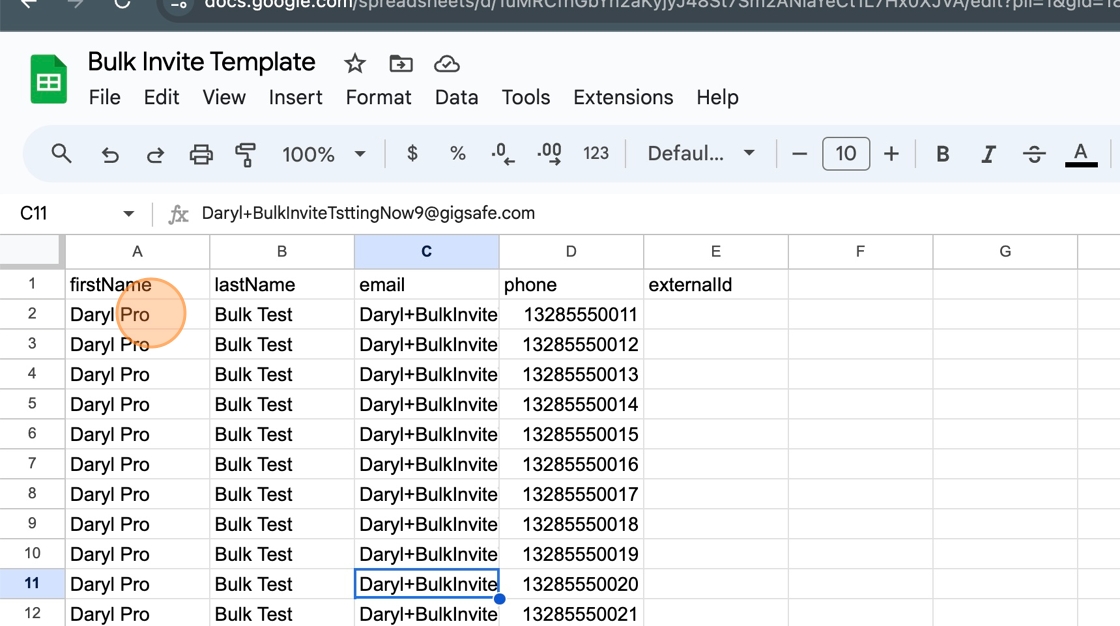
<aside> ℹ️ Contractor IDs are automatically generated by the GigSafe system. Some customers want to set custom contractor IDs to match their internal IDs or the IDs set by their TMS software. This is possible via two ways:
<aside> ⚠️ Alert: This ID is used for payments. If setting unique IDs is important to you - please take the time to do it now during bulk invite. You can manually set this later, but it is by a driver by driver profile basis.
</aside>
<aside> ⚠️ Alert: Access the Bulk Upload template: https://docs.google.com/spreadsheets/d/1_GC347XwzdR94LQsSdy9AVfZq8pY8DxyRjt-vJRwPxI/edit?usp=sharing
Remember to delete the sample data. Data must be formatted correctly in order to upload
</aside>